Droid Dashcam - Video Recorder
- 4.3
- Rating
- 1.00M
- Installs
- Free
- Price

 Analysis by App-foxy
I like driving tools that stay out of the way, and Droid Dashcam - Video Recorder is built around that idea. It turns an Android phone into a practical dashboard camera, recording the road while adding information directly onto the video. That approach is more useful than it sounds: a recording can show not only what happened, but also when and where it happened, provided the relevant phone information is available and configured correctly.
My overall view is simple: this is a sensible choice for drivers who want a dedicated recording workflow without buying another camera, especially if they value hardcoded subtitles more than a polished editing suite. It is not a replacement for a purpose-built dashcam in every situation, though. A phone still needs a safe mounting position, a reliable power source, enough storage, and careful setup before the first trip.
What makes the recording approach useful
The app comes from DroidCoolApps and sits in the Auto & Vehicles category rather than trying to be a general video camera. That focus matters. The interface and purpose are centered on recording journeys, so the useful question is not whether it can produce cinematic footage. The better question is whether it can quietly document a drive in a form that remains understandable later.
You May Also Like

 Blood Strike: 2.5 Anniversary
Blood Strike’s Loadouts Turn Every Drop Into a Tactical Gamble
A close look at Blood Strike’s custom loadouts: how fast access to signature weapons reshapes its battle royale rhythm, rewards preparation, and narrows the gap between fights.

 Pandora - Music & Podcasts
Pandora’s Music Is Easy to Start, but Harder to Recover
Pandora’s strength is its low-effort path from a seed to a station. Its weak spot is how much confidence it asks you to place in connection, setup, and quiet recovery.

 8 Ball Pool
 Is Built on Rivalries, Rematches, and Routine
A close look at the rivalries, rematches, shared routines, and unanswered safety questions that turn a quick pool match into a persistent mobile community.

 Samsung Music
’s Quiet Strength Is Playing What You Already Own
Its reach comes less from spectacle than from dependable access to a personal library. That simplicity is both the app’s strongest retention engine and its ceiling.

 AccuWeather: Weather Radar
AccuWeather Review: A Quick, Clear Forecast for Everyday Decisions
For everyday plans, the best forecast is the one you can understand quickly. AccuWeather makes rain timing, radar, and local conditions easy to act on, with a few trade-offs.

 Hill Climb Racing
Why Hill Climb Racing Still Turns Crashes Into One More Run
A tiny car, a bumpy hill and one more upgrade: Hill Climb Racing keeps resurfacing because its simple chaos makes every near-miss feel personal.
More From Our News Desk
View All News


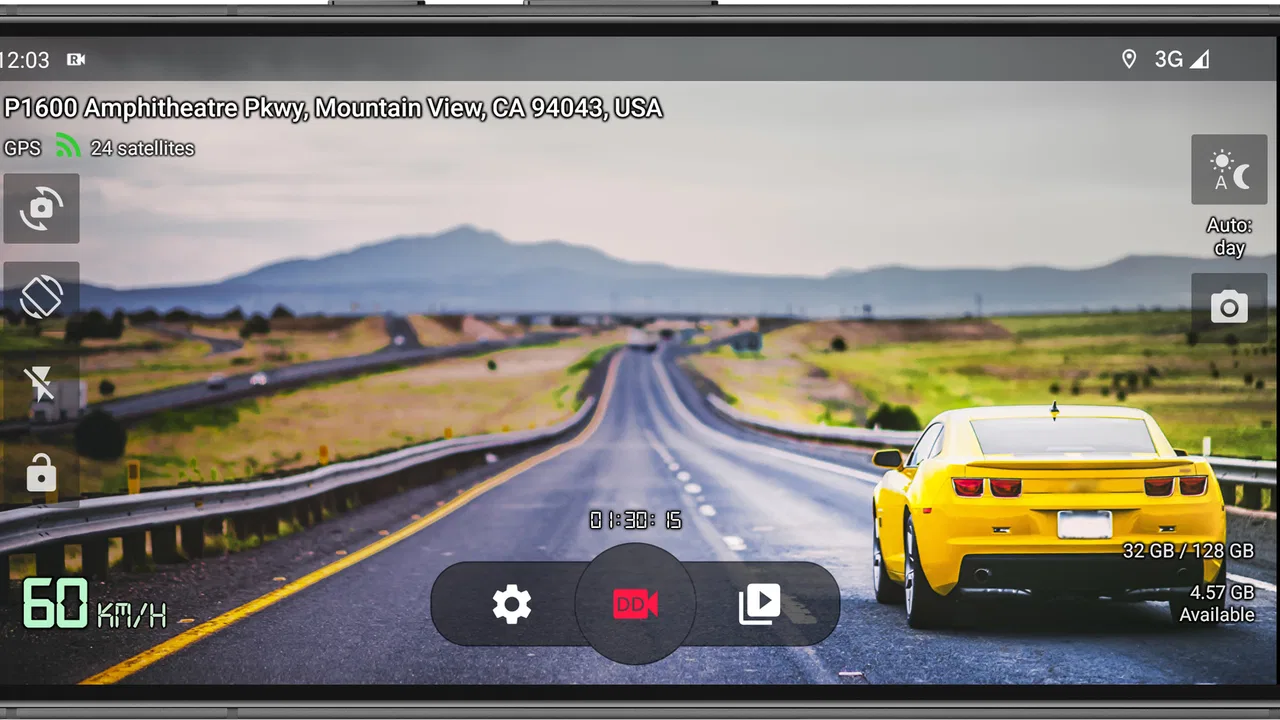
Its most distinctive idea is the use of hardcoded subtitles. Instead of keeping driving details separate from the picture, the app places them on the video itself. This can make a clip easier to interpret when it is copied to another device or shared with someone who does not have the app. The trade-off is permanent: once text is written into the image, it becomes part of that recording. I would therefore spend time checking the layout before relying on it for important trips.
That distinction separates this app from a normal phone camera. A standard camera is flexible, familiar, and often better for spontaneous clips, but it does not naturally organize itself around road recording. Droid Dashcam is more purposeful. It encourages a repeatable routine: mount the phone, connect power, open the recorder, check the view, and let the device document the journey.
The app is free to install, which makes experimenting with that routine easy. Optional in-app purchases range from $0.99 to $7.99 per item, so I would test the basic workflow first and only pay for something after deciding that the app fits the way I drive. Its Everyone content rating also makes it broadly approachable, although that rating says nothing about whether a particular phone, mount, or vehicle setup is suitable.
A realistic everyday driving routine
Imagine leaving for work on a rainy morning. I would place the phone in a stable mount, connect it to the car charger, open the recorder, and check that the road fills the useful part of the frame. The important step is not simply pressing record. It is confirming that reflections, the dashboard, or a poorly chosen angle are not hiding the lane ahead.
After the drive, the subtitle information can help me identify the clip without trying to remember which file belongs to which trip. If an unusual incident occurred at an intersection, the embedded details may provide helpful context when reviewing the footage. That is a small but meaningful advantage over a folder full of anonymous videos from a regular camera app.
I would also create a habit of checking the first and last few seconds of a recording after changing the phone position. A mount that shifts slightly can change the whole usefulness of the footage. The app can record what the camera sees, but it cannot correct a blocked lens, glare, or a phone that points too high toward the sky.
Why lightweight operation matters
The app is presented as a high-performance, lightweight video recorder, and that positioning makes sense for a phone that may already be busy with navigation, charging, and other driving tasks. In practice, lightweight behavior is valuable because a dashcam application should not make the phone feel like it is struggling during a long journey.
Still, I would not treat the word “lightweight” as permission to ignore the phone itself. Video recording can consume storage and power, and a phone mounted behind a windshield can become warm. A good setup leaves room for the device to breathe, keeps the screen at a sensible brightness, and avoids running unnecessary apps at the same time. These are not flaws unique to Droid Dashcam, but they affect how dependable the experience feels.
There is another practical trade-off. A phone used as a dashcam is less available for other tasks. If I need navigation, I have to decide whether the same device can handle both jobs comfortably. For some drivers, an old spare phone is the best match because it can remain dedicated to recording. For others, a separate dashcam is more convenient because it does not compete with the phone used for directions and calls.
Setup details that make a bigger difference than expected
The first is camera position. I would mount the phone behind the windshield but outside the driver’s direct view, with the lens aimed at the road rather than the hood. A low angle may capture too much dashboard, while a high angle can reduce useful detail near the vehicle. The best position depends on the car, so there is no universal setting I would copy blindly.
The second is subtitle readability. Text that looks fine while the phone is in my hand may become distracting or too small once the video is viewed on another screen. I would record a short test, transfer or replay it normally, and check whether the information can be read without covering important road details. This is one of the app’s strongest ideas, but it requires more attention than simply leaving a camera overlay enabled.
The third is file handling. I would review how much space a typical drive consumes before planning a long trip, then remove or archive clips that no longer matter. Keeping every recording forever makes finding an important moment harder and can eventually leave the phone unable to continue recording. A simple routine of saving significant clips and clearing ordinary ones is more useful than treating the phone as an unlimited archive.
Finally, I would test charging while recording. Some vehicles provide weak or inconsistent power through older adapters, and a cable can interfere with the mount or the phone’s controls. If the phone stops charging during a journey, the app may still be working while the overall setup quietly becomes unreliable. Testing the complete arrangement at home is much better than discovering that problem halfway through a trip.
Where the app is genuinely stronger than a normal camera
The main strength is purpose. A normal camera app makes me build the process myself, while this application is designed around road documentation. The hardcoded information gives each clip a useful identity, and that can save time when reviewing several journeys.
I also appreciate the balance between a dedicated dashcam and a full video-editing application. Droid Dashcam is not trying to turn driving footage into a social-media production. That restraint is helpful for someone who wants evidence or a record of a route rather than filters, transitions, or manual editing.
Its audience size suggests that the concept has broad appeal: it has passed one million installs, carries a 4.3 average from around nineteen thousand ratings, and has 805 written reviews. Those figures do not guarantee that it will behave identically on every phone, but they do indicate that this is an established app rather than an obscure experiment with no visible user base.
The current version is 1.1.26, and the app runs on Android 7.0 or newer. That makes it relevant to people using older Android hardware as a dedicated recording device, which is one of the more practical ways to use it. An unused phone that cannot comfortably run modern games may still be perfectly useful for a simple driving role, as long as its camera, battery, storage, and charging arrangement are in good condition.
The meaningful limitations I would consider first
The biggest limitation is that the app does not remove the physical weaknesses of a phone. A phone camera may be excellent in daylight but less convincing at night, in heavy rain, or when headlights create glare. The result depends heavily on the device’s lens and image processing, not just the recorder.
Hardcoded subtitles are also a double-edged feature. They make context convenient, but they permanently occupy part of the frame and cannot be cleanly removed from the saved video. If I wanted a clean image for later editing, I would prefer a camera workflow that keeps metadata separate or lets me choose the overlay for each recording. This app is better suited to immediate, self-contained documentation than to footage intended for extensive post-production.
Another weakness is the need for discipline. A dedicated dashcam often starts with the vehicle and stays installed, while a phone-based setup can be forgotten, moved, left uncharged, or used for something else. The app cannot compensate for not pressing record, a loose mount, or a cable that disconnects. I would call this a workflow risk rather than a software defect, but it is important for anyone expecting automatic reliability.
There is also a safety boundary. I would configure the app before driving and avoid changing settings, reading small text, or handling the phone on the road. A recording tool is not worth creating a distraction. If the phone position blocks visibility or makes navigation awkward, a separate installed dashcam may be the better choice even if it costs more.
Who should use it, and who should choose something else
I would recommend it to a driver who already has a spare Android phone, wants a low-cost way to record journeys, and values information printed directly onto the video. It is particularly appealing for people who need a simple record of commutes, road trips, delivery routes, or unfamiliar drives and do not want to learn a complicated editing system.
It can also suit someone who changes cars frequently. A phone and mount can move between vehicles more easily than a permanently installed camera, although the user still needs to recalibrate the position and check the charger each time. That portability is convenient for occasional use, such as a long holiday drive or a route where I expect unusual traffic conditions.
I would skip it if my priority is a completely hands-off system that starts whenever the engine starts, remains permanently mounted, and does not compete with my navigation phone. In that case, a dedicated dashcam is the more natural option. I would also look elsewhere if I need advanced editing, a clean image without permanent text, or dependable low-light performance that depends on specialized camera hardware.
People who want to record scenic drives for creative video may find a conventional camera app more flexible. It gives more freedom over framing and produces footage that is easier to edit later. Droid Dashcam makes a different compromise: it favors practical context and repeatable road recording over artistic control.
My final recommendation
After looking at the complete workflow, I see Droid Dashcam - Video Recorder as a focused utility rather than a universal camera replacement. Its best idea is the combination of road recording and information embedded directly into the footage. That makes clips easier to understand later, especially when they are viewed away from the original phone.
The free entry point is another reason I would suggest trying it, particularly with an older Android phone that can become a dedicated recorder. I would not buy accessories or rely on it for important journeys until I had tested the camera angle, charging, storage routine, subtitle layout, and night performance in my own vehicle.
My verdict is positive with a clear condition: the app is only as dependable as the driving setup around it. For a careful user who wants straightforward dashcam-style recording and accepts the limitations of a phone, it is a useful and approachable choice. For someone demanding automatic operation, maximum image quality, or clean footage for editing, a dedicated dashcam or a regular camera app will be a better fit.
In short, I would recommend giving it a trial before spending money on a separate device. It delivers the most value when I treat it as part of a tested routine, not as a magic button that guarantees perfect evidence on every drive.
FAQs for Droid Dashcam - Video Recorder
01What is Droid Dashcam and how does it work?
Droid Dashcam is a mobile application designed to transform your smartphone into a dashcam. It records video footage while you drive, capturing incidents, road trips, or any scenic routes. The app uses your phone’s camera and GPS to document time, location, and speed, providing reliable evidence in case of accidents or disputes.
02Does Droid Dashcam affect the phone’s battery life significantly?
Using Droid Dashcam can have a noticeable impact on battery life, as recording video and using GPS are power-intensive tasks. It is recommended to keep your phone connected to a charger while using the app for extended periods to ensure continuous recording and avoid battery drain.
03Can Droid Dashcam record videos in the background while using other apps?
Yes, Droid Dashcam is designed to run in the background, allowing you to use other apps simultaneously. This feature ensures that you can continue to use navigation or music apps without interrupting the video recording. It’s essential to check your device’s multitasking capabilities for optimal performance.
04Is there a limit to how much video Droid Dashcam can store?
The storage capacity for videos recorded by Droid Dashcam depends on your device’s available storage. The app allows you to manage storage by setting limits on video duration and quality. Old recordings can be automatically deleted to free up space, ensuring continuous operation without manual intervention.
05Does Droid Dashcam require an internet connection to function?
Droid Dashcam primarily operates offline, using your device’s camera and GPS. However, an internet connection is needed for certain features like cloud backup or sharing videos via email or social media. This ensures your recordings are safely stored and easily accessible when needed.
Pros
- Easy to set up and use interface.
- High-quality video recording options.
- Seamless GPS tracking integration.
- Supports background recording mode.
- Automatic storage management feature.
Cons
- Consumes significant battery power.
- Limited cloud storage options.
- Ads can be intrusive at times.
- Requires frequent app updates.
- Some features locked behind paywall.

Droid Dashcam - Video Recorder
Gallery